In the early morning hours of Korean time, at 2 a.m., a thrilling minting event took place.
As an avid participant in the BYL mining journey through consistent walking and driving modes,
I couldn’t believe my luck when I discovered it was a free mint event called “FREE MINT.” Setting my alarm, I eagerly joined the minting frenzy and eagerly awaited the benefits that awaited me.
In this blog post, I will share the anticipated rewards I found on Discord and guide you
through the steps of this exciting minting experience.
Anticipated Benefits on Discord:
On Discord, I stumbled upon some exciting benefits that awaited participants:
A. Automatic acquisition of BYL in small amounts.
B. Conversion of all NFTs within the BOOOST ecosystem, initially focusing on digital vehicles.
C. Exclusive airdrop rewards for token holders.
To participate in the event, visit the following link:
Discover the latest updates and enhancements in HiveMapper Dashcam OS 2.0. Explore the new features, improved performance, and how to update the firmware.
In this blog post, we will delve into the exciting world of HiveMapper Dashcam OS 2.0 and its significant updates. Whether you’re curious about the product or interested in the latest advancements,
this article has you covered. HiveMapper Dashcam OS 2.0 offers an enhanced mapping experience and various improvements that you won’t want to miss.
Section 1: Understanding HiveMapper Dashcam
HiveMapper Dashcam is a revolutionary Drive to Earn (D2E) service that enables collaborative map building. Discover how you can contribute to mapping services while earning rewards.
Section 2: Major Updates and Enhancements
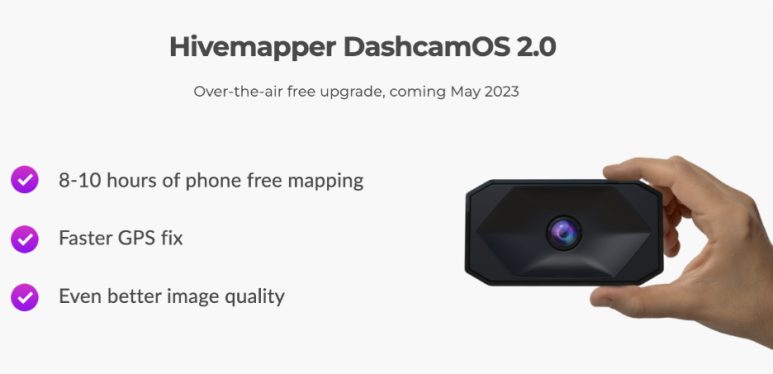
Explore the remarkable updates that make HiveMapper Dashcam OS 2.0 a game-changer, including:
– Independent HiveMapping without a smartphone
– Increased storage capacity for over 100k+ HiveMapped images
– Enhanced GNSS lock time (GPS improvement)
– Reduced waiting time for data transmission to your phone
– Updated LED indicator information for better visibility
– Improved firmware update process stability
Mapping Without a Smartphone Discover the newfound freedom of HiveMapping without relying on a smartphone. Learn how HiveMapper Dashcam OS 2.0 empowers you to map independently and overcome the limitations of smartphone connectivity.
Section 3: Upgrading to HiveMapper Dashcam OS 2.0 4.1
Update Procedure Simplified
Follow these step-by-step instructions to upgrade to HiveMapper Dashcam OS 2.0:
1) Download the new HiveMapper app (available on Android Play Store and Apple App Store)
2) Launch the HiveMapper app before connecting the Dashcam and wait for approximately 2 minutes
3) Connect the Dashcam to Wi-Fi and accept the firmware update
4) Once the update is successful, the Dashcam will reboot, and the LED indicator will turn blue
Section 4: Notable Information
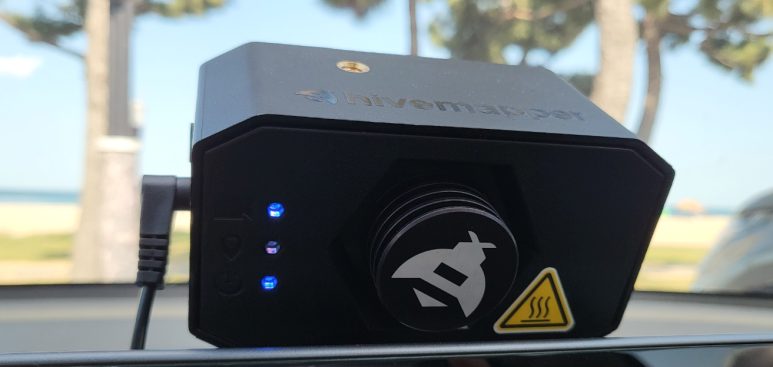
Get acquainted with the new LED indicators and their meanings:
1) Top Light: Bright – HiveMapping in progress, Dim – Paused
(Yellow: Connect HiveMapper app to Dashcam, Storage Full)
2) Middle Light: Bright – Strong GPS signal, Dim – Weak or no GPS signal
3) Bottom Light: Power On
Section 5:FAQ
1) Where is the Start/Pause button located?
-> It has been removed. Now, the Dashcam maps automatically without the need for manual control.
2) Does the Dashcam know when the mapping process starts?
-> Yes, it automatically starts and stops mapping during the available HiveMapping hours in a day. Outside those hours, the LED indicator on the top will become dim.
3) How long can the Dashcam map independently?
-> The mapping duration varies based on the time and distance traveled. If the Dashcam is left without connecting to the app for a long time, it may take longer to download and upload the corresponding images. Remember to upload the mapped data for the respective week.
4) Can multiple Dashcams be connected to the same smartphone?
-> While simultaneous connections are not possible, you can connect multiple Dashcams to the same smartphone individually.
5) Does upgrading to Dashcam OS 2.0 affect HONEY rewards?
-> No, there are no changes to the structure of HONEY rewards with the Dashcam OS 2.0 upgrade.
Don’t miss out on this opportunity! Purchase now using the link below and enjoy an additional 10% discount with the code: EARNEVERYTHING.
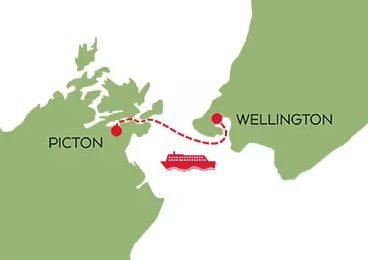
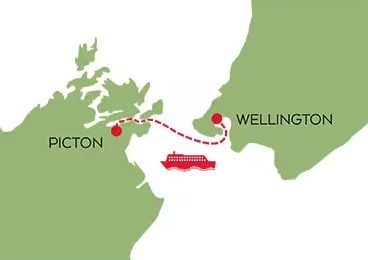
Traveling between New Zealand’s North and South Islands often involves ferry transportation, which can pose unexpected challenges when renting a car.
Most rental car companies have policies that require returning the vehicle in Wellington or Picton and renting a new one for the other island.
This blog post provides a comprehensive comparison of the inter-island ferry policies of various rental car companies in New Zealand.
By understanding these policies, you can plan your journey more effectively and have a smoother travel experience.
Contents 1. AVIS Car Rental (Multi Island Hire, Return and Re-rental) 2. BUDGET Car Rental (Island Hopper, No Returns, Ferry Use Allowed) 3. HERTZ Car Rental (Return and Re-rental) 4. APEX Car Rentals (No Returns, Ferry Use Allowed) 5. EURO CAR Rental (Return and Re-rental) 6. Summary
1. AVIS Car Rental (Multi Island Hire, Return and Re-rental)
Despite the name “Multi Island Hire,” which suggests continuous travel between islands, AVIS allows you to make a single reservation to travel between the North and South Islands, returning and renting a car in Wellington and Picton, respectively. AVIS does not permit ferrying rental cars between islands, and if you return a car to a different island than where you rented it, an additional NZD 450 may be charged.
2. BUDGET Car Rental (Island Hopper, No Returns, Ferry Use Allowed)
With BUDGET New Zealand, you can use the Island Hopper process to travel between the North and South Islands with the same vehicle. You can leave your luggage in the car and board the ferry without the hassle of unpacking and repacking. Some rental conditions may apply, such as a minimum rental period or one-way fares. If you prefer not to take the rental car on the ferry, you can make separate reservations for each island.
While you can make a reservation starting on one island and ending on the other with HERTZ, you must return the vehicle on the island where you rented it. Ensure to provide ferry information in the reservation comments section to guarantee that a vehicle will be available on the disembarking island. If you do not return the car on the same island, relocation fees of up to NZD 1,000 may apply.
4. APEX Car Rentals (No Returns, Ferry Use Allowed):
APEX Car Rentals allows you to rent a car and travel across Cook Strait using the ferry. When renting a vehicle for travel between the North and South Islands, ferry tickets are automatically included in the reservation.
EURO CAR vehicles cannot be taken on ferries. Therefore, if you wish to travel between the North and South Islands, you must return the car at the ferry terminal on one island and pick up another car at the ferry terminal on the other island. EURO CAR treats reservations for North and South Island travel as separate bookings.
The process of returning and re-renting a car during your journey can be cumbersome and inconvenient. It may involve additional fees when transporting a rental car on the ferry, and novice drivers may feel apprehensive. Be aware that there are cases of confusion and delays when dealing with weekend return and re-rental processes. Additionally, some local rental companies have received negative reviews regarding poor vehicle conditions and customer service. It is crucial to research and gather information before making a decision.
Note: Policies may vary, so it is recommended to check the specific terms and conditions on each rental car company’s website or contact their customer service directly.
Please note that this information is based on the policies and information available as of 2023, and it is always advisable to verify the current policies with the respective rental car companies before making any reservations.
Safe travels and enjoy your journey in New Zealand!
목차 1. 대출의 목적 2. 대출지원 요건 및 한도액 3. 대출종류별 지원 요건 4. 대출 취급 은행
1. 대출의 목적
국가 유공자 등에 대한 주거안정과 자립기반 조성을 위해 대부지원을 합니다.
2. 대출지원 요건 및 한도액
– 전체 자금의 5% 이상을 계약금으로 납부한 경우에만 대출 지원 가능 단, 주택임차대부(갱인계약), 상업대부(운영자금), 생활안전대부 제외 – 대출금 산정 시 신청인이 대부 신청 전에 이미 납부한 계약금 제외 – 주택대출(주택개량 제외) 신청자는 신청일 현재 무주택자에 한함 – 무주택 확인 대상 대출대상자 본인, 배우자, 주민등록표상 동거하는 직계존속 (배우자의 직계존속 포함), 직계비속 및 그 배우자 대출대상자의 배우자가 세대 분리된 경우 배우자의 주민등록표상 등재되어 있는 대출 대상자의 직계비속 및 그 배우자 – 주택을 매도하는 경우 그날 주택이 없는 것으로 인정함
– 대출 받은 국민은행, 농협에서 ‘조세면제증명서’, ‘대부재산증명서’를 발급받아 관할 지방자치단체 세무과에 제출하면 취득세를 면제받을 수 있습니다. (전용 85㎡ 이하의 경우 취드금액에 대해 면제, 초과인 경우는 대출 금액에 대해서만 감면) – 또한 대부금으로 취득한 재산 및 담보로 제공한 재산의 근저당권 설정 및 말소 등기비용이 면제되며 근저당권 설정 에 따른 국민주택채권 매입도 면제됩니다.
주택대부
※ 선순위로 받은 대출이 국민은행, 농협이 아니면서 2순위로 나라사랑대출을 받고 싶은 경우
1순위 대출을 모두 상환하셔야 합니다.
※ 신규로 유공자가 되신 분은 꼭 첫 보상금 수령 후에 은행 방문해야 합니다.
※ 버팀목 전세자금 대출과 나랑 사랑대출 중복 대출됩니다.
※ 담보물의 구입, 분양, 전세 기간 등에 따라 금리가 달라지므로 금리 및 이율 안내를 참고부탁드립니다.
3. 대출종류별 지원 요건
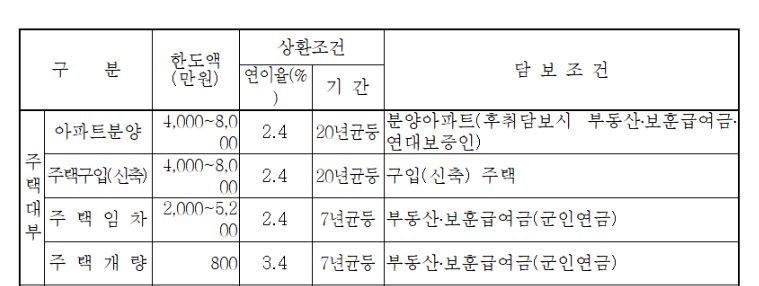
1) 주택구입 대부
A. 대부조건
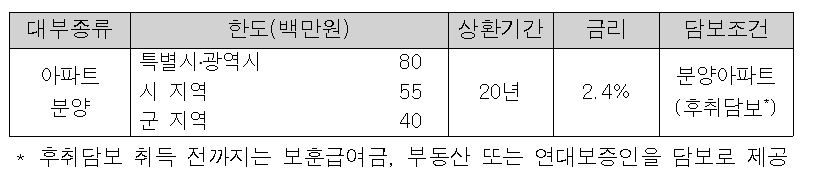
조건은 군지역 4천만원에서 특별시-광역시 기준 8천만원까지입니다. 금리는 2.4% 고정입니다.
Season 2 of ‘Squid Game’ is scheduled to start filming this year and will be released next year
On the 29th, Netflix announced additional cast members for the second season of ‘Squid Game’. Along with TOP, this list included Lee Jin-wook, Lee David, Park Kyu-young, Cho Yu-ri, Kang Ae-sim, Noh Jae-won, and Won Ji-an.
1. Im Si-wan : He was a member of boy group band ZE:A but He is way more famous as an actor.
Filmography : The attorney, One Line, Emergency Declaration
Netflix
His drama and film In Netflix.
2. Kang Ha-neul : He is a actor. He did many television dramas such as Misaeng, Moon Lovers etc.
His drama and film In Netflix.
3. Park Sung-hoon : He is a actor in Korea.
netflix
4. Yang Dong Geun (YDG) : He is a actor, singer-songwriter, dancer and rapper.
netflix
His drama and film In Netflix.
5. Jo Yu-ri : South Korean singer and actress. She was Iz*One (2017-2020)
6. TOP (BingBang) : He was a group member of BingBang.
Hankook.com
and including Kang Ae-shim, Lee David , Lee Jin-wook , Choi Seung-hyun , Roh Jae-won , Won Ji-an and Park Gyu-young